
Ria Money Transfer
Ria Money Transfer (Ria Financial)Finance
4.810.58K Reviews
- Version
- 3.102.60
- Installs
- 10.00M
- Age Rating
- Everyone
Screenshots
Our Review of Ria Money Transfer
 Analysis by Appyee
Sending money abroad can feel more complicated than it should. You have to choose a service, enter the recipient’s details correctly, understand how the recipient will receive the funds, and check the total cost before confirming anything. I found Ria Money Transfer useful because it puts that process into a mobile finance app rather than making me start at a physical location or search through several separate tools. It is aimed at international transfers, including payments to Mexico, India, and more than 190 countries.
My overall impression is positive, especially for someone who sends money to family or friends overseas and wants a straightforward starting point. The app is free to install, its content rating is Everyone, and it comes from Ria Money Transfer, also known as Ria Financial. It is not a digital bank or a general budgeting app, so its value depends on whether you actually need cross-border money transfers. For that specific job, it gives beginners a clear route from opening the app to preparing a transfer.
Getting from installation to a completed transfer
I focus here on the practical path from installing Ria Money Transfer to preparing a payment, with particular attention to the checks that help prevent a rushed mistake. Having the recipient’s details ready—and agreeing in advance on how they will collect or receive the funds—makes the process easier to judge. The next section looks at what a new user should expect before getting started.
What to expect before you begin
The first thing I would clarify is what this app does and what it does not try to be. Ria Money Transfer is built around sending money internationally. You should approach it as a transfer service rather than expecting checking-account features, investment tools, bill tracking, or a full personal-finance dashboard. That focused design is helpful because the main task stays visible, but it also means the app is not a replacement for your everyday banking application.
The service is free to download, while the transfer itself should be reviewed carefully before you submit it. A free app does not automatically mean that every transaction has no cost. Exchange rates, delivery choices, payment methods, and destination details can affect the final amount. I recommend treating the final review screen as the important point in the process, not assuming that the first amount you type is the amount the recipient will receive.
The app has a strong presence on mobile stores, with an average rating of 4.8 from around 265 thousand ratings and more than 10 million installs. That level of adoption makes it easier to feel comfortable trying the service, although popularity should not replace checking the details of your own transfer. A high rating can tell you that many people find the app useful; it cannot tell you whether a particular delivery option suits your recipient.
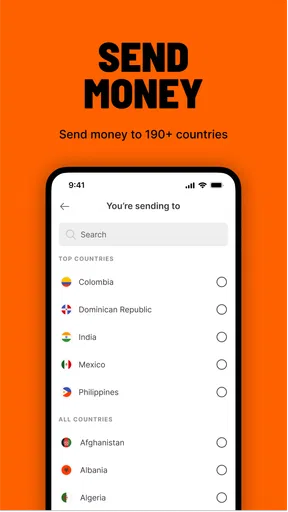
It supports international transfers to Mexico, India, and over 190 countries. That broad reach is one of its clearest advantages, but the practical experience can still vary by destination. Before promising someone a specific way to receive money, I would first check the options shown for that country inside the app. The recipient may need a bank account, a pickup arrangement, or another supported method, depending on what is available for the transfer you are creating.
Setting up the account without rushing
After installing the app, I would keep the recipient’s information nearby before starting. This is a small preparation step, but it prevents the most common beginner mistake: beginning a transfer while still trying to find a correct name, account detail, or contact number. International payments are not the place to guess at spelling or copy information from memory.
The setup process is easier when your personal details match the information you normally use for financial services. Enter your name consistently, review every field, and avoid using casual abbreviations if your official information uses a longer form. If the app asks you to verify something, complete that step carefully rather than repeatedly trying slightly different versions of the same information.
One useful habit is to separate account setup from transfer setup. First make sure you can sign in and understand the main screen. Then start the payment when you have enough time to read the destination, amount, recipient, and delivery information. Doing everything while distracted makes it much easier to select the wrong country or overlook a change in the recipient’s details.
The Android release is listed as version 3.102.60 and requires Android 8.0 or later. That makes checking your phone’s operating system worthwhile before you plan around the app. On iOS, the exact installation experience can differ from Android, but the same practical advice applies: install it from the official app marketplace, keep your login details secure, and do not hand your account access to the recipient or to anyone claiming to “help” with a transfer.
Making the first meaningful transfer
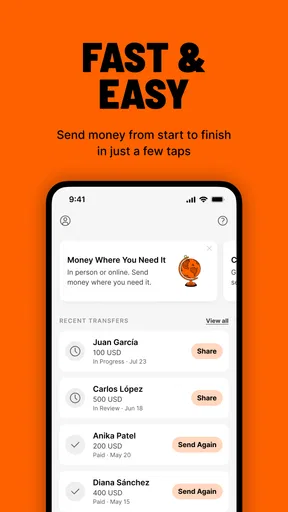
For a first attempt, I would choose a modest amount that genuinely needs to be sent rather than creating a large test transaction. Start by selecting the destination country, then enter the amount and inspect how the transfer is presented. The important question is not only how much you are sending, but also how much the other person is expected to receive and how they will get it.
Imagine that a relative in Mexico needs money for an ordinary household expense. I would open the app, select Mexico, enter the sending amount, add the relative as the recipient, and choose the available delivery method that fits their situation. Before confirming, I would call the relative and read back the name and receiving details. That short conversation is more valuable than trying to fix an error after the transfer has already been submitted.
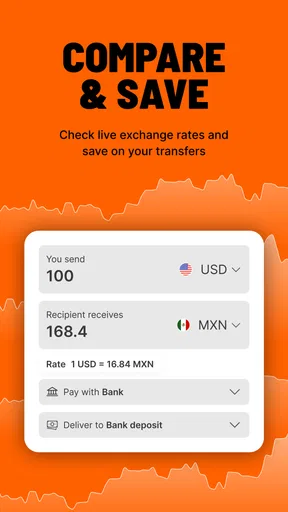
Once the information looks correct, pause on the summary screen. Check the currency, the recipient’s name, the destination, the total you will pay, and the amount shown for the recipient. If the result is different from what you expected, do not confirm simply because you have already spent time filling out the form. Go back and investigate whether the difference comes from the exchange rate, a fee, or the selected delivery method.
After submitting, keep the confirmation information available and tell the recipient what to expect. I would not describe a transfer as complete merely because the app accepted the request. The useful milestone is when the recipient can actually access the funds through the chosen method. A screenshot or saved confirmation can help you discuss the transaction, but it should be stored privately rather than posted in a chat group.
Where new users usually get confused
The biggest source of confusion is the difference between the amount sent and the amount received. Those figures can be displayed in different currencies, and the recipient’s amount may not match a quick conversion made with a search engine. The app’s own summary is the one I would use for the decision because it reflects the transfer being prepared, not a general market estimate.
Another point that deserves attention is delivery method. A bank deposit and a cash pickup are not interchangeable experiences for the recipient. Someone without convenient banking access may prefer pickup, while another person may value having the money placed directly into an account. The fastest-looking option is not automatically the most convenient one if the recipient has to travel, provide identification, or work around limited opening hours.
Recipient details are another area where a few seconds of care can prevent a serious problem. Do not assume that a nickname is enough, and do not copy an old recipient record without checking it. People change phone numbers, bank accounts, and addresses. I would confirm the details every time, particularly when sending to someone I have not paid recently or when the money is urgent.
It is also easy to confuse the app’s free download with the cost of sending money. I would read the transfer summary each time, even if I have used the service before. Conditions can differ by country, currency, and delivery choice, so relying on memory is a poor shortcut. The final review screen should answer the practical questions: what leaves my account, what reaches the recipient, and how will the recipient obtain it?
Security deserves the same attention as convenience. Use a private device, protect your sign-in information, and be suspicious of messages asking for passwords, codes, or payment outside the app. If somebody contacts you claiming that a transfer is blocked and asks you to send money to release it, I would stop and verify the situation through the official service rather than following the message.
Small workflows that make repeat transfers easier
For regular family support, I would create a simple personal checklist outside the app: recipient name, country, delivery method, amount, and the date of the last confirmation. This is not glamorous, but it reduces errors when several relatives or several countries are involved. It also helps distinguish a recurring payment from an unusual one that deserves extra checking.
A second useful workflow is to contact the recipient before opening the transfer screen. Ask whether their preferred receiving method is still practical and whether their identifying details have changed. This is especially helpful when a recipient alternates between bank access and cash pickup. Choosing the method after the transfer has been prepared can lead to unnecessary backtracking.
I would also compare the recipient’s real need with the transfer amount rather than sending a rounded figure automatically. If the app shows the expected received amount clearly, use that information to decide whether the payment covers the intended expense. This avoids the awkward situation where the sender thinks a bill is fully covered but the recipient receives less after conversion or charges.
For a first-time user, the best “advanced” technique is simply learning to slow down at the confirmation stage. Many finance apps reward speed in their design, but international transfers reward accuracy. Save the confirmation privately, tell the recipient which method was selected, and avoid sending a second payment just because the first one is not immediately visible. Check the transaction status and communicate before duplicating it.
Who will benefit most from it
I think this app is a strong fit for people who send money across borders more than once, especially when the recipient lives in one of the many supported destinations. It is also useful for a newcomer who wants an app dedicated to transfers rather than a crowded banking application with unrelated menus. The international focus makes the purpose easy to understand.
It can suit someone supporting family abroad, paying a person in another country, or arranging occasional help while traveling. The app’s broad destination coverage is valuable when your recipients are not all in the same region. The fact that it is free to install also makes it easy to examine the available route before deciding whether it fits your particular transfer.
I would be more cautious about recommending it to someone who sends money only domestically, needs a full bank account, or mainly wants to track spending. A normal bank transfer may be simpler when both people use the same country’s banking system. Likewise, a dedicated digital wallet may be better for frequent small payments between users who already share that platform. Ria’s strength is international sending, not being an all-purpose financial home.
How it compares with familiar alternatives
The usual alternatives are a traditional bank’s international transfer service, a digital wallet, or a physical money-transfer location. Compared with a bank, a dedicated transfer app can feel more direct because the journey is centered on the recipient and destination. A bank may still be preferable if you want all records in one banking relationship or if the recipient’s account arrangement is already established there.
Compared with a digital wallet, Ria can make more sense when the recipient does not use the same wallet or when destination coverage is the deciding factor. Wallets can be convenient for people already inside one shared ecosystem, but that convenience depends on both sides being able to use it. I would choose based on the recipient’s actual access rather than on which app looks quickest on my phone.
Compared with a physical location, the mobile route is more convenient when I already have the necessary information and do not want to travel. A physical location may feel reassuring to someone who wants face-to-face assistance, particularly for a first transfer. The app is better for people who prefer to review details privately and manage the process from home.
The trade-off is that an app puts more responsibility on the sender. There is no counter attendant to notice that a name looks incomplete or to explain a delivery choice in person. That is why I would not choose the mobile option purely for speed. I would choose it when I am comfortable checking the details myself and when the recipient understands how the money will be received.
What to know before relying on it
The app’s high average rating, around 11 thousand written reviews, and large install base suggest that many users find the experience worthwhile. Still, a transfer service can be judged only in the context of a particular route. The country, currency, payment arrangement, and receiving method all matter. My recommendation is to evaluate the exact quote and delivery choice shown for your transaction instead of assuming that another person’s experience will be identical.
Another limitation is the emotional pressure around urgent transfers. When someone is waiting for rent, food, or a medical expense, it is tempting to confirm quickly. I would resist that pressure long enough to verify the recipient and the final amount. A clear app does not remove the consequences of entering incorrect information, and convenience should never replace a final review.
Updates can also change the way screens are arranged. The current version is 3.102.60, so the labels and layout may evolve over time even when the basic purpose remains the same. If a familiar button moves after an update, I would follow the transfer summary carefully rather than relying on an old screenshot or remembered sequence. That approach is safer than treating the interface as permanently fixed.
My recommendation for a first-time user
I would recommend starting with a real but manageable transfer, preparing the recipient’s details beforehand, and involving the recipient in the choice of delivery method. The first successful action is not simply pressing send. It is completing a transfer whose destination, cost, receiving method, and final amount are understood by both sides.
For me, the app succeeds because it keeps international transfers at the center and supports a wide range of destinations without requiring a visit to a physical location. Its weaknesses are the same responsibilities that come with any self-service financial tool: I must read the summary, verify the recipient, and avoid guessing about timing or cost. If I am willing to do that, the experience feels practical rather than intimidating.
My bottom line: Ria Money Transfer is worth trying if you need to send money internationally and want a focused mobile workflow. It is free, accessible to a general audience, and available for Android devices running Android 8.0 or later. I would skip it in favor of a bank or wallet when the transfer is purely domestic or both people already have a simpler shared option. For cross-border support, however, it gives a first-time sender a sensible path from setup to a carefully checked payment.
Verdict
Strengths of Ria Money Transfer
- Send money to many countries through a widely recognized transfer service.
- Multiple delivery options, including bank accounts and cash pickup.
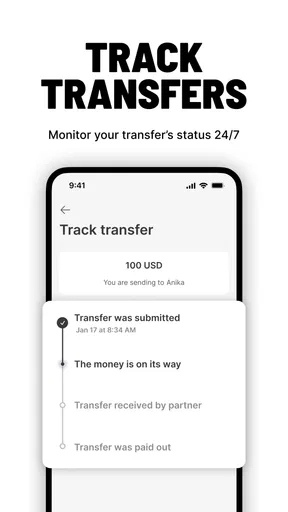
- Transfer tracking helps you monitor the status of your payment.
- Supports repeat transfers by saving recipient and transaction details.
- Customer support and help resources are available within the app.
Limitations of Ria Money Transfer
- Exchange rates and fees can vary depending on destination and payment method.
- Some transfers may require identity verification and additional documents.
- Cash pickup availability depends on local agents and their opening hours.
- Delivery times can change because of weekends, holidays, or compliance reviews.
- Certain features and transfer limits vary by country and user account.
Similar Picks in This Category
View All
Google Wallet
Google LLC4.3

Airtel: Recharge, Bank & Loans
Airtel4.0

PayPal - Pay, Send, Save
PayPal Mobile4.2

DANA Indonesia Digital Wallet
PT Espay Debit Indonesia Koe4.5

Binance: Buy Bitcoin & Crypto
Binance Inc.4.8

Cash App
Block, Inc.4.7
Frequently Asked Questions
What is Ria Money Transfer, and how does it work?
Ria Money Transfer is an international money transfer service that lets you send funds to people in supported countries through its mobile app, website, or participating agent locations. Depending on the destination, the recipient may receive money in a bank account, mobile wallet, debit card, or as cash pickup. Before confirming a transfer, the app displays the exchange rate, service fee, delivery option, and estimated arrival time.
Is Ria Money Transfer safe to use?
Ria uses account security measures, identity verification, transaction monitoring, and encrypted connections to help protect transfers and personal information. However, no financial service is completely risk-free. Users should download the app only from the official app store, keep login details private, enable available security features, and never send money to someone they do not know. Be especially cautious of requests involving urgency, prizes, or guaranteed returns.
How much does it cost to send money with Ria?
The total cost depends on the sending country, destination, transfer amount, payment method, delivery method, and current exchange rate. Some transfers may have a low or zero advertised fee, but the exchange-rate margin can still affect the final amount received. Review the complete cost breakdown in the app before submitting payment, because fees and exchange rates can change and may differ from one transfer route to another.
How long does a Ria Money Transfer take to arrive?
Delivery time varies according to the destination country, recipient’s payout method, payment method, compliance checks, weekends, holidays, and local banking schedules. Cash pickup can sometimes be available quickly, while bank deposits and mobile-wallet transfers may take longer. The app normally provides an estimated delivery time and transfer status. Delays can occur if additional identity or transaction information is requested, so estimates should not be treated as guarantees.
What information and documents are needed to use Ria Money Transfer?
You generally need to create an account with personal information such as your legal name, phone number, email address, and country of residence. Depending on the transfer amount, destination, payment method, or local regulations, Ria may request a government-issued identification document, proof of address, or additional details about the recipient and purpose of the transfer. Make sure all information matches official documents to avoid verification problems or delays.
